Best Canva Alternative for Social Media Content in 2026 — When a Design Tool Is Not Enough
SnapReel
May 16, 2026 · 12 min read

Table of Contents
Canva changed what was possible for small brands.
Before Canva, producing professional-looking social media graphics required either design skills or a designer. Most small brands had neither. Their options were generic stock imagery, simple text posts, or paying someone every time they needed a visual.
Canva removed that barrier almost entirely. The drag-and-drop editor, the enormous template library, and the intuitive interface meant that a founder with no design background could produce polished branded graphics in minutes. For millions of small brands, it was genuinely transformative.
That contribution is real. And in 2026, it is also exactly twenty-five percent of what social media content actually requires.
Canva is a design tool. An excellent one. But social media in 2026 is not primarily a graphic design problem — it is a video production problem, a consistency problem, a platform-native content problem, and a scheduling and analytics problem. Canva solves the first piece. It was never built to address the rest.
The small brands looking for a Canva alternative in 2026 are not looking for something that makes better graphics. They are looking for something that handles the full content workflow — creation, production, scheduling, and performance — without requiring four separate tools to fill the gaps that Canva leaves open.
This guide explains what Canva does well, where it consistently falls short for social-first brands, and why SnapReel AI is the Canva alternative that handles everything Canva cannot.
What Canva Does Genuinely Well — And Why Two Hundred Million People Use It
Canva's user base passed two hundred million monthly users in 2026. That number reflects something real about what the tool delivers for a specific type of content need.
The template library is Canva's most powerful feature and the reason most small brands first choose it. Thousands of professionally designed templates for every format — Instagram posts, LinkedIn carousels, YouTube thumbnails, email headers, presentations, and more — mean that starting a piece of content never requires staring at a blank canvas. The starting point is always a template that is already visually coherent, and the customization from there is minimal.
The Magic Studio AI features added in recent years bring genuine capability to the platform. Magic Write generates copy. Magic Edit enables intuitive image manipulation. The AI background remover and image expansion tools handle tasks that used to require Photoshop. For a small brand producing graphic content, these additions meaningfully reduce the skill requirement for producing polished output.
Brand Kit functionality — storing your brand colors, fonts, and logo in one place and applying them to any template with a click — keeps brand consistency manageable across a high volume of content. For brands managing multiple content formats, having brand assets always available within the design tool eliminates a consistent point of friction.
Canva's accessibility across devices — desktop browser, mobile app, and tablet — means content production is not tied to a specific workstation. A founder can make a quick adjustment to a scheduled post from their phone without losing quality or having to switch contexts.
These are genuine strengths, and they are the reason Canva belongs in the conversation for small brands whose primary content need is graphic design. The problem is that graphic design is only one component of what social media success requires in 2026 — and for many small brands, it is not even the most important one.
The Four Gaps Canva Leaves Open That Small Brands Are Feeling in 2026
The brands searching for a Canva alternative are not dissatisfied with Canva's design capabilities. They are frustrated by what happens after the design is done — and by the realization that the design is only the starting point of a workflow that Canva does not support.
Gap One — Canva Is Built for Graphics, Not for Video
This is the most fundamental limitation for small brands in 2026, and it is the gap that is driving more alternative searches than any other Canva shortcoming.
Canva has added video editing features over the years. You can trim clips, add text overlays, apply basic transitions, and export videos. For a brand that needs to create a simple presentation video or animate a static graphic, these capabilities are functional.
For a brand that needs to consistently produce short-form video content that performs on TikTok, Instagram Reels, and YouTube Shorts — the platforms actually driving audience growth for small brands in 2026 — Canva's video capabilities are not built for that use case.
The distinction is important. Platform-native video for TikTok and Instagram Reels is not a graphic with movement. It is content with a specific structure, pacing, caption placement, hook delivery, and visual language that the algorithm rewards. It requires a different kind of tool than a graphic design application that also handles video.
Canva's interface was built for static layouts. When you are editing video inside Canva, you feel that origin — the tool works against the natural flow of video editing rather than with it. Users consistently describe Canva video editing as inefficient and clunky compared to dedicated video tools.
The result is that small brands using Canva for their social media content face a choice: either produce sub-optimal video content inside Canva, or maintain a separate video production tool alongside Canva. Both options have real costs — either the quality of the video, or the time and subscription cost of running two tools simultaneously.
Gap Two — Canva Does Not Schedule, Publish, or Analyze
Canva creates content. It does not distribute it.
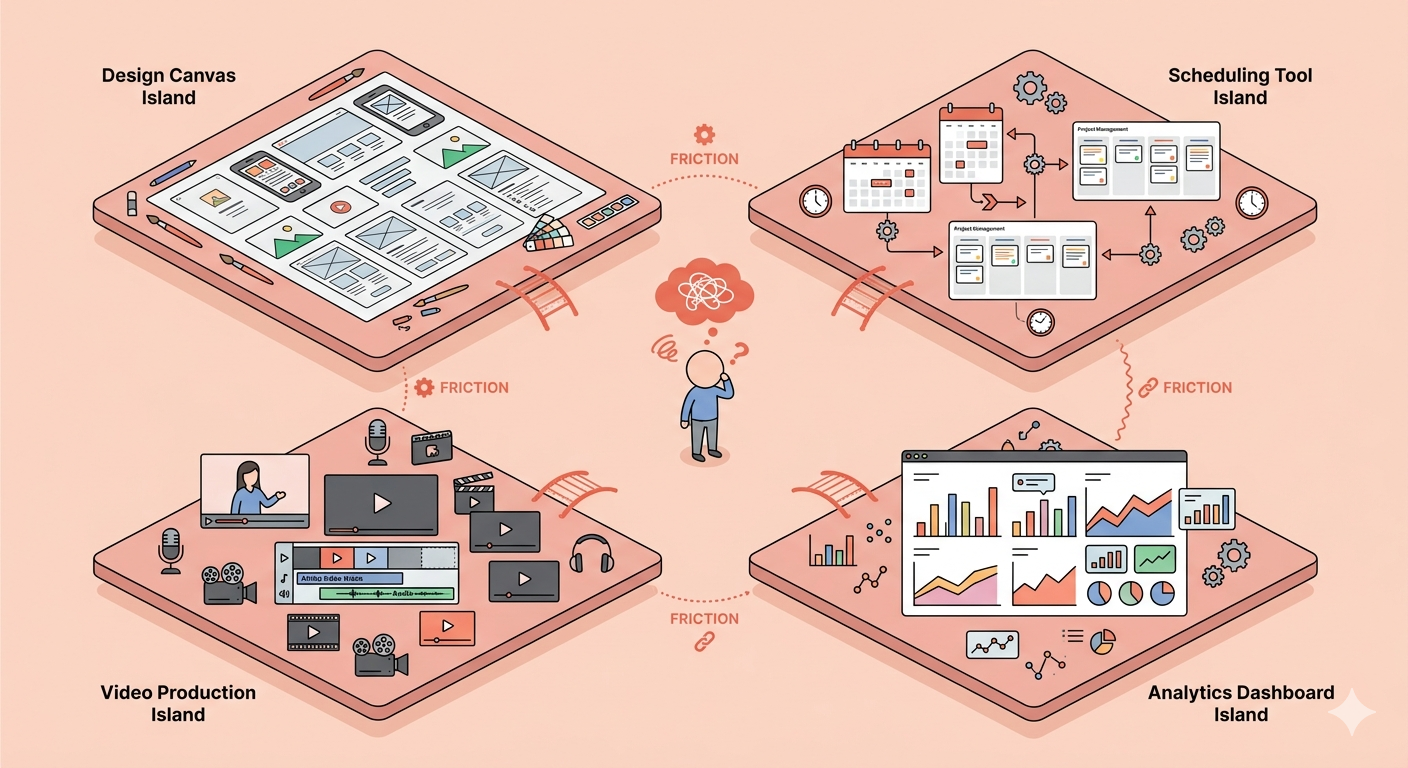
When you finish a design in Canva, you download it and then open your scheduling tool to upload it and schedule it for publication. That context switch — from design to scheduling — is a friction point that compounds across every piece of content your brand produces.
Canva has made some moves toward social publishing, but the functionality is limited and the experience of managing a full content calendar within Canva is not what the tool is built for. The scheduling integrations available are basic, and serious content calendar management still requires a separate dedicated tool.
This means that a small brand using Canva as its primary content creation tool is running a workflow that requires at minimum two applications — Canva for creation and something else for scheduling — and more likely three or four when video production and analytics are added.
Each additional tool in the workflow adds cost, adds login management, adds context switching, and adds a point where content can get delayed or lost in the handoff between applications. For a small team that cannot afford to have social media management take up an outsized portion of the working week, this fragmentation is a real operational cost.
Gap Three — Template Fatigue Creates a Brand Identity Problem Over Time
Canva's template library is one of its strongest features. It is also the source of a problem that small brands discover after months of consistent use.
When two hundred million people are drawing from the same template library, the visual landscape of social media fills with content that looks familiar. Brands using the same templates end up with content that, despite having different logos and colors, shares the same layouts, the same structural choices, and the same visual rhythms.
For a small brand trying to build a distinctive visual identity that their audience recognizes on a scroll, template-based content creation works against that goal over time. The templates that make getting started easy are the same templates making differentiation harder as the brand scales.
The brands that have been using Canva for two or three years and are now looking for alternatives are often driven by this exact realization — that their content looks like Canva content rather than their brand content, and that the template-first approach has created a ceiling on how distinctive their visual identity can become.
Gap Four — Canva Does Not Know Your Brand Voice
Canva stores your visual brand assets — colors, fonts, logos. It does not know what your brand sounds like.
Every caption, every headline, every copy element in a Canva design is written by the person using the tool. Canva's AI writing features generate generic suggestions that require significant editing before they reflect a specific brand's voice, product language, and audience expectations.
For a small brand that has developed a distinct voice over time — the specific way they talk about their products, the language patterns their audience expects, the personality that runs through every post — Canva provides no mechanism for capturing or applying that voice consistently.
This means that even a brand with a beautifully consistent visual identity in Canva is likely producing copy that varies significantly in voice from post to post, depending on who wrote the caption that day and how much time they had.
What the Right Canva Alternative Needs to Solve
The brands looking for a Canva alternative are not looking to replace their design tool with a better design tool. They are looking to replace their design-tool-centered workflow with a content workflow that actually covers what social media demands in 2026.
The gaps that need filling are specific. Video production that is native to TikTok, Instagram Reels, and YouTube Shorts — not video editing layered onto a graphic design interface. Content scheduling and publishing that lives in the same workflow as content creation, not as a separate application. Analytics that tell the brand what is working and inform what to create next. And brand voice consistency that applies to copy as reliably as brand colors apply to visuals.
A genuine Canva alternative for social media in 2026 is not a better design tool. It is a full content workflow that makes the design tool's role smaller — because the design work is handled automatically as part of producing content that is ready to perform on the platforms that matter.
Why SnapReel AI Is the Canva Alternative for Social-First Small Brands
SnapReel AI was built around the assumption that design is a means to an end, not an end in itself. The goal is not a well-designed graphic — it is a piece of content that performs on a specific platform with a specific audience. Everything SnapReel AI produces is built backward from that outcome.
Video-First Content That Canva Was Never Built to Produce
SnapReel AI generates short-form video content built natively for TikTok, Instagram Reels, and YouTube Shorts. Not video exported from a graphic design tool. Not video adapted from a static template. Video content produced from the ground up for the format, pacing, and visual language that performs on each platform's algorithm.
For a small brand that has been producing graphic content in Canva and wondering why their video presence is inconsistent or underperforming, this is the specific capability that changes the equation. The video creation problem — the one Canva cannot solve — is SnapReel AI's primary purpose.
Creation and Distribution in One Workflow
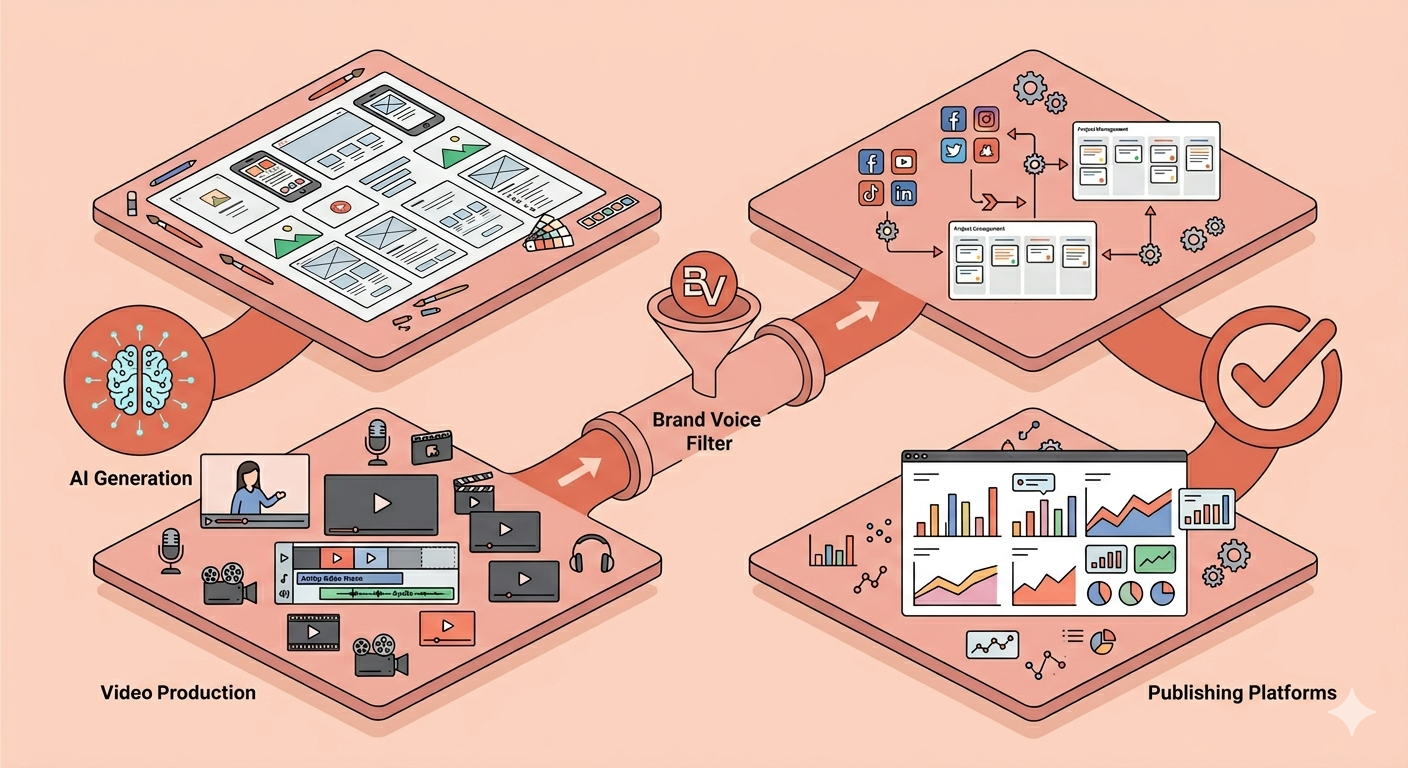
SnapReel AI handles content generation and content scheduling within the same platform. The workflow that currently requires Canva plus a scheduling tool plus a video tool collapses into one application.
Content is generated, reviewed, and published to the correct platforms at the correct times — without downloading files, opening new tabs, uploading to a different tool, or managing a handoff between applications. For a small team, the hours saved in workflow management over the course of a month are hours that go back into the business.
Brand Voice Built Into Every Piece of Content
SnapReel AI learns your brand's specific language — not just your visual identity, but how you talk about your products, what your audience expects to hear, and the personality that runs through every piece of content your brand produces.
Where Canva stores your colors and fonts, SnapReel AI applies your voice. The captions, the hooks, the calls to action — all generated in the language your brand actually uses, not in a generic AI style that requires editing before it sounds like you.
This is the difference between tools that help you stay visually on-brand and tools that help you stay entirely on-brand — visually, verbally, and structurally across every platform you publish on.
Performance Analytics That Connect Back to Creation
SnapReel AI's analytics identify which content formats, topics, and video styles are driving meaningful engagement with your specific audience — and use those insights to inform the next round of content generation.
Where Canva has a download button at the end of the creation process, SnapReel AI has a feedback loop. Every post that performs contributes to a clearer picture of what your audience responds to, and that picture directly shapes what the platform generates next.
This is what a design tool cannot do — because design tools do not know how the content performs after it leaves the tool.
Skip the design work entirely — SnapReel generates fully branded Reels and posts with no editing required.
Put these tips into action — start creating with SnapReel for free.
Who Should Move Beyond Canva — And Who Should Stay
Canva is still the right tool for specific use cases in 2026. Being clear about that makes the switching decision easier.
Canva remains excellent for producing graphic content for non-social contexts — presentations, print materials, email headers, event collateral, and any visual need where a polished static design is the end goal. For these use cases, Canva's template library and design tools are genuinely hard to beat at its price point.
Canva is also still a reasonable choice for brands whose social media strategy is primarily graphic-based — brands in categories where illustrated carousels, quote graphics, and styled product photos drive their engagement, and where video is not yet a significant part of the content mix.
SnapReel AI is the right move for brands that are primarily growing on video platforms and finding that Canva's video capabilities do not produce content that competes with what is performing in their niche. It is the right move for brands running three or four tools to manage their social media workflow — Canva for design, a video tool, a scheduler, an analytics platform — and spending more time managing the tools than managing the content strategy. It is the right move for brands that have been using Canva for long enough that their content looks like Canva content rather than their brand content.
The shift from Canva to SnapReel AI is not about leaving design behind. It is about putting design in its correct place — as one automatic component of a content workflow that starts with a brand brief and ends with a published post that is ready to grow an audience.
SnapReel AI does what comes after the design. And in 2026, what comes after the design is where social media growth actually happens.