Why AI Captions Sound Robotic and How to Fix Them
SnapReel
September 21, 2026 · 7 min read
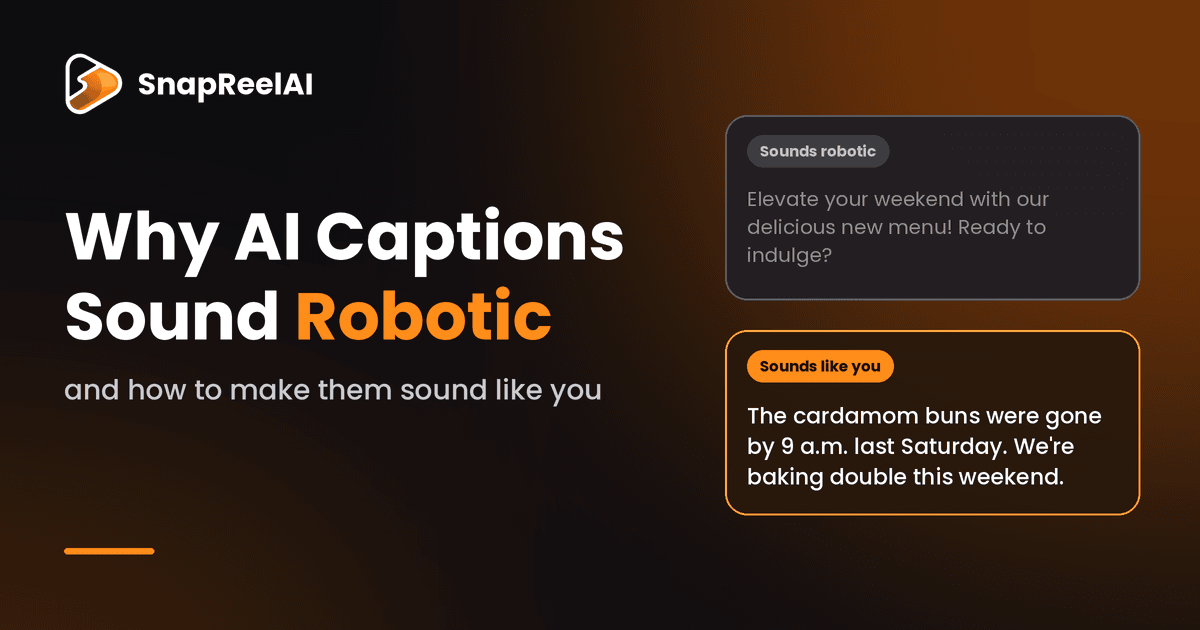
Table of Contents
- 1.
- 2.
- 3.
- 4.
- 5.
- 6.
- 7.
- 8.
- 9.
You know the caption when you see it. It opens with a question, promises to "elevate" something, and ends with a line that could sit under any brand's photo. Nothing in it is wrong. Nothing in it is yours, either.
If your AI captions sound robotic, you're not being picky. You're noticing something real, and you can fix it. Below: why it happens, how to spot it in your own posts, and how to get AI to write the way you actually talk.
Why AI captions all sound the same
AI writing tools work by predicting the most likely next word, based on a huge amount of existing text. That makes them great at producing something average. Smooth, safe, agreeable. And average is the opposite of a brand voice.
A few things follow from that:
Sentences come out at the same length, with a neat little wrap-up at the end.
Marketing words creep in. "Elevate," "unlock," and "game-changer" show up so often in ad copy that the AI treats them as normal.
There's no opinion and no detail. Left alone, AI won't mention your street, your best customer, or the thing you think your industry gets wrong. It doesn't know any of that unless you tell it.
So the tool usually isn't the problem. It just has nothing of yours to work from.
5 signs a post was written on autopilot
Pull up your last five posts and check them against this list.
Every sentence is about the same length. People mix short lines with long ones. Robots don't.
Words nobody says out loud. Would you tell a customer at your counter to "elevate your morning routine"? If not, cut it.
A question as the opener. "Ready to transform your weekend?" is the caption version of a stock photo.
No specifics. No number, name, place, price, or moment. Just "quality" and "passion."
No point of view. A competitor could post it word for word.
Three or more in one post? It's on autopilot. Rewrite it or drop it.
How to teach AI your brand voice
You already have a voice. It lives in the posts you wrote on the days it felt easy. The job is to pull it out and hand it to the AI in a form it can follow.
1. Collect your best 10
Pick the 10 posts that sounded most like you, or the ones your audience liked most. Fewer than 10? Use what you have.
2. Find the patterns
Look at how you usually open a post, which phrases keep coming back, how long your sentences run, and which words you'd never use. Write these down in plain language.
3. Turn the patterns into do's and don'ts
"Friendly and professional" tells the AI almost nothing. "Short sentences, contractions, a little dry humor, no exclamation points in the first line" tells it a lot. Add one line you'd write and one you never would.
4. Give it an opinion
Tell the AI something you believe that others in your industry get wrong. One real opinion pulls the writing away from the middle of the road faster than any tone setting.
5. Feed it something true and specific every time
A real detail beats a clever prompt. This week's special, a customer story (with their permission), a mistake you made and fixed. AI can't invent these honestly, so it needs them from you.
What if you have no posts yet?
New account? You still have samples of your voice, they're just not on social media. Look at how you answer customer emails and DMs, your product descriptions, your About page, or a voice note where you explain what you do out loud and then transcribe it. Use those the same way you'd use past posts.
Writing for an American audience
If your customers are in the U.S., put a few things in your voice notes, because AI tends to flatten them:
Sound like your customers. A neighborhood coffee shop in Austin and a B2B software company in Chicago shouldn't read alike. Contractions, casual phrasing, and local references help.
Name real places and moments. "Saturday farmers market," "the after-school rush," and "our Tuesday special" beat "our valued customers."
Match the season. Q4 is close: Halloween, Black Friday, Small Business Saturday, the year-end rush. AI won't know what's on your calendar unless you say so.
Set American spelling. Tell the AI to use "color," "flavor," and "organization" so British spellings don't slip through.
The same post, two ways
Here's an illustration of the difference. This is a made-up example for a small bakery, written to show the gap, not results from a real account.
Bare prompt: "Write an Instagram caption about our new weekend menu."
Elevate your weekend with our delicious new menu! 🥐 Made with love and the finest ingredients, every bite is a treat. Ready to indulge? Visit us today!
Same request, with voice notes and one real detail (short sentences, dry humor, and the fact that the cardamom buns sold out by 9 a.m. last Saturday):
The cardamom buns were gone by 9 a.m. last Saturday. We're baking double this weekend. Doesn't mean you should sleep in.
The second caption is shorter, has a number, a moment, and a bit of attitude. The information it uses came from a person. That's most of the fix.
A 5-minute check before anything goes live
Even with good voice notes, look over the week's posts before they publish:
Read each one out loud. If you stumble or wince, your followers will too.
Run the five signs above. Fix or cut anything with three or more.
Make sure each post has one real detail. A name, number, place, or moment.
Try deleting the first sentence. The second one is often the real opener.
Check facts, prices, and dates. AI doesn't know your hours changed yesterday.
What a human still needs to do
AI can draft, schedule, and learn from what performed well. A few jobs still belong to you:
Approving what goes live. You know what's true this week and what would land badly.
Anything time-sensitive. Local news, events, a sold-out item.
Replies and comments. Those are conversations with customers, not content.
Stories only you have. No tool can tell your customer's story for you.
SnapReelAI is built around that split. It reads your brand voice, past posts, and audience to draft a week of content, and you review and approve it before anything is published.
FAQ
Will my followers notice it's AI? They notice generic writing more than they notice AI. A post with a real detail and a clear opinion reads as yours, however it was drafted.
Do I need to tell people I use AI? For ordinary captions you wrote or reviewed yourself, there's generally no blanket U.S. rule that every AI-assisted post must be labeled. The rules get stricter around fake or AI-generated reviews and testimonials, endorsements, and realistic AI-generated people, and some states and platforms are adding their own labeling requirements. Advice online is inconsistent, so check the FTC's current endorsement guidance and each platform's AI-label policy. If you run ads or work with influencers, ask a lawyer. This isn't legal advice.
How long does setup take? Gathering your best 10 posts and writing your voice notes takes about 15 to 30 minutes. The weekly check after that takes about five.
Try it on your own brand
If you'd rather not build all of this by hand, connect an account to SnapReelAI and see how a week of drafts reads next to your own posts. It works with Instagram, TikTok, X, LinkedIn, and Facebook, and new accounts get 200 free credits with no credit card needed. Judge the drafts against the five signs above. If it doesn't sound like you, you've lost nothing.